Events from Apple Calendar, your reminders and the journeys in between – in one calm daily view. Dayavue tells you when it’s time to leave and makes room for everything in between.
Apple CalendarPlan your eventsApple RemindersCollect your tasksYour maps appNavigate on the go
More than your next appointment
The time is set. Plan the way there, too.
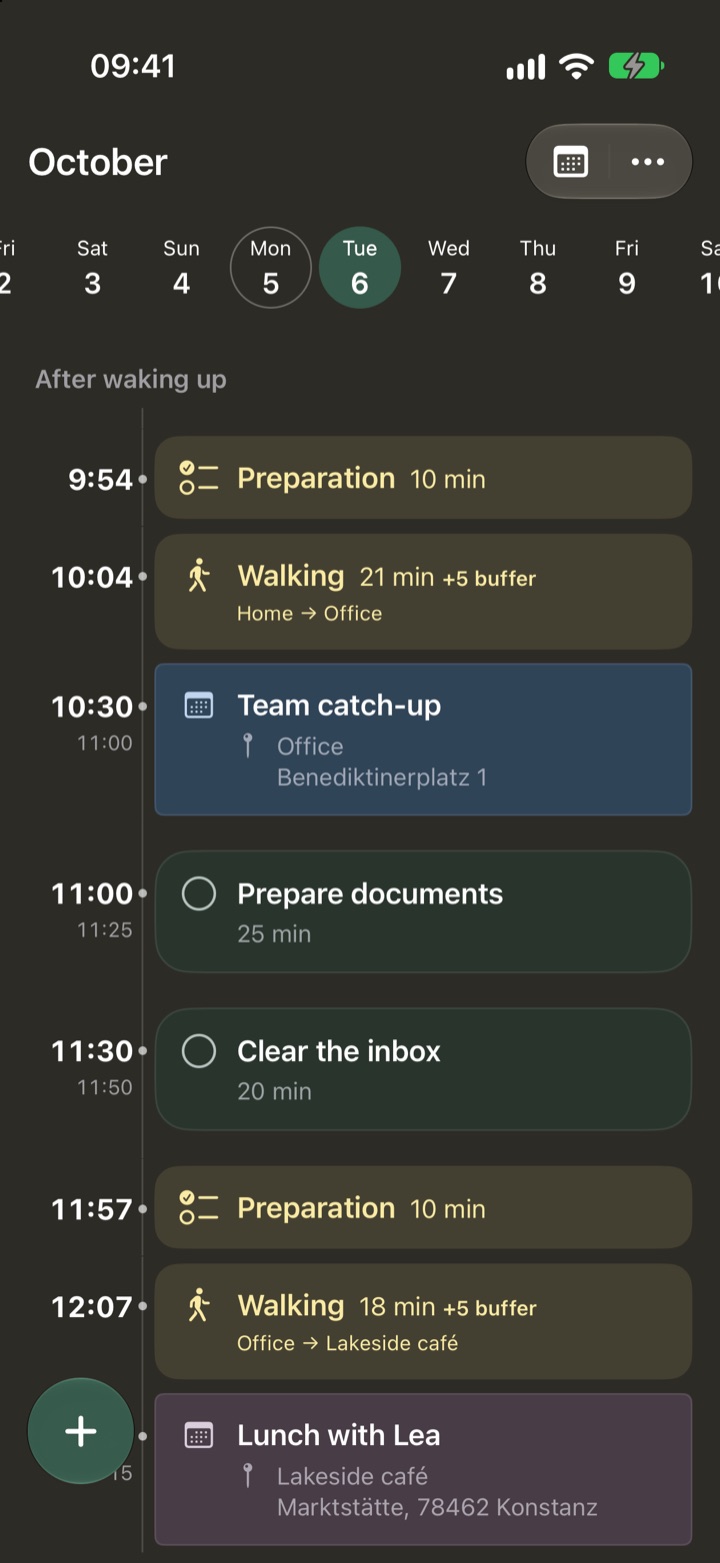
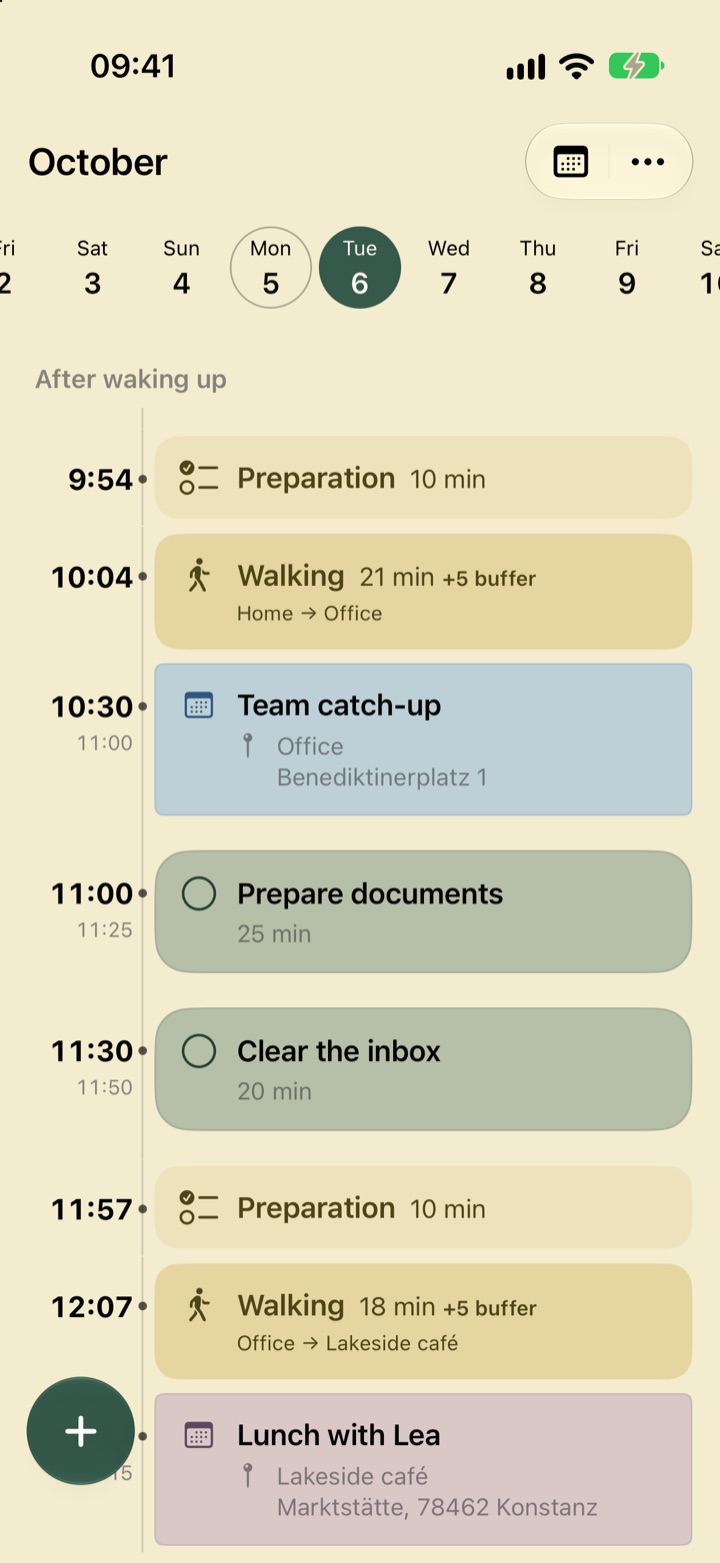
It starts at 10:30. But when do you need to leave? Dayavue allows for travel, time to get ready and a little buffer – and plans your day backwards from the appointment.
Try it: how will you get there?
Walking: get ready at 9:54, leave at 10:04.
A simplified demo with fixed example times. In the app, use Apple routes or enter a travel time yourself.
Your TuesdayOCTOBER 6
⌂ Home
Preparation10 minutes to get ready
Walking21 min travel + 5 min buffer
Team catch-up10:30–11:00 · Office
Prepare documents25 min · Your reminder
A calmer view of your day
Less searching. More clarity.
Your familiar entries in one calm view – from your first plan to the end of the day.
01 · REMINDERS
What matters today is already there.
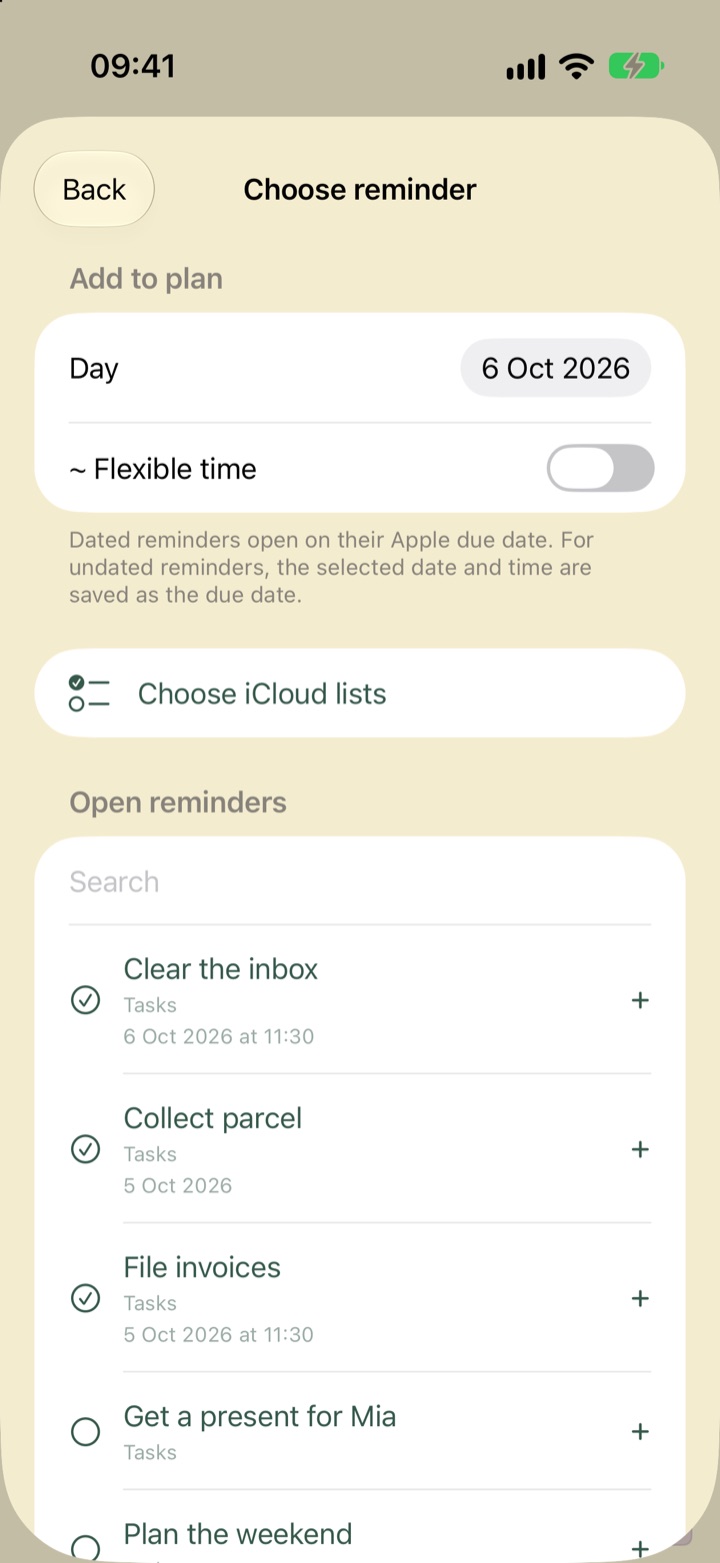
Reminders with a due date appear on their day automatically – with a time, right in the timeline. Pick undated tasks from your iCloud lists whenever you need them.
Completing a task in Dayavue completes it in Apple Reminders
A time budget per task keeps your day realistic
02 · TIME IN BETWEEN
And the time in between?
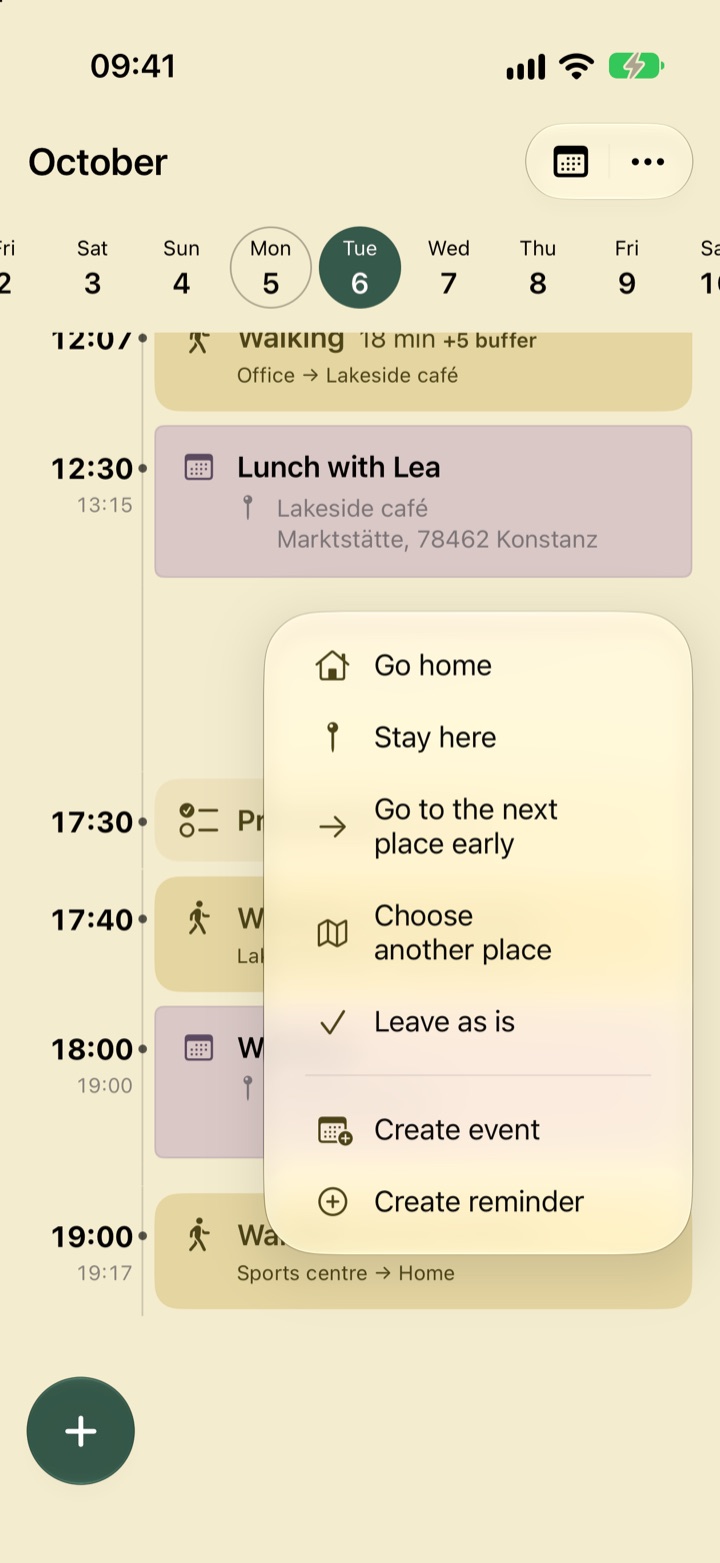
Almost five hours between lunch and your workout. Go home, stay where you are, head on early or go somewhere else entirely? Dayavue asks and plans the right journeys.
Short gaps simply take up one line
Create an event or reminder right from the gap
03 · FINISH YOUR DAY
Tomorrow is a new day.
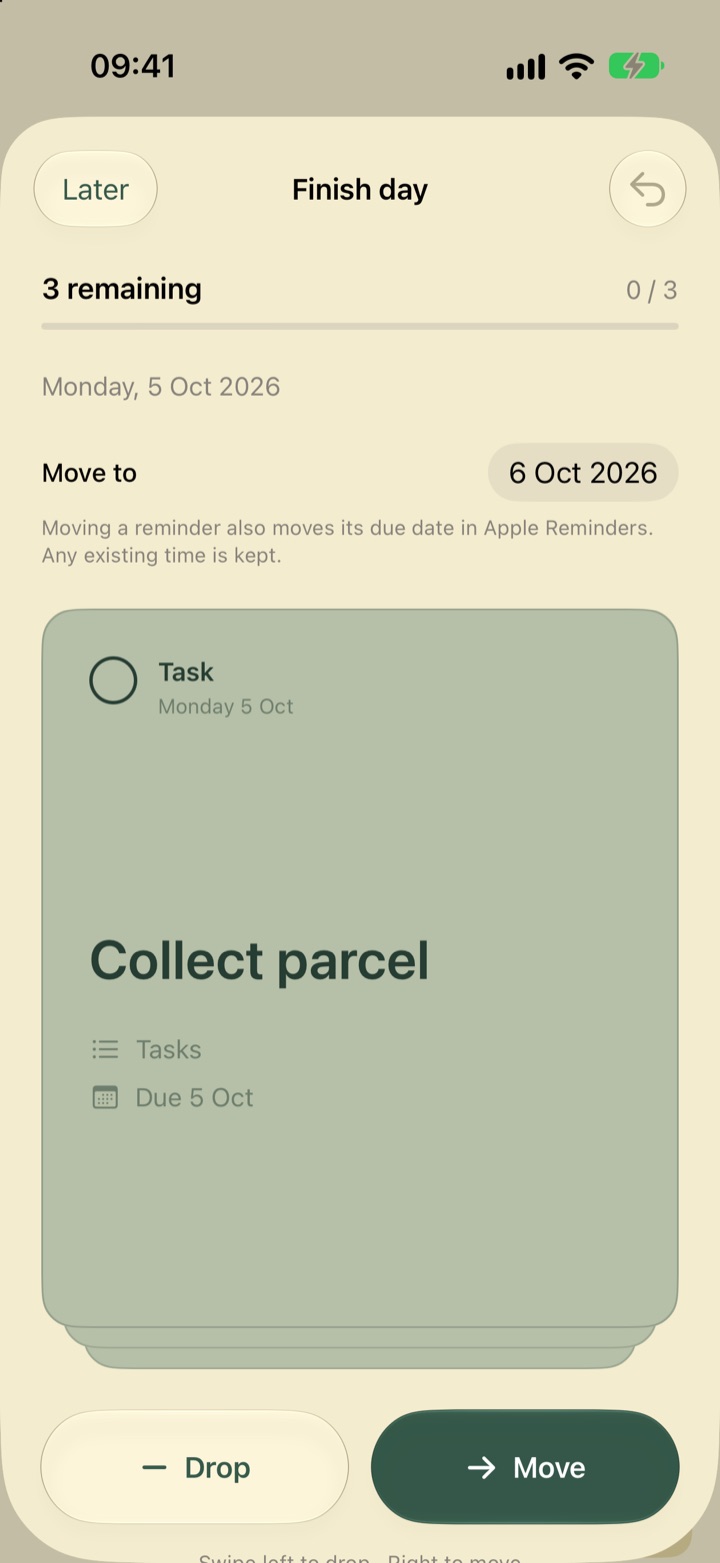
In the evening, go through open reminders card by card: move them or drop them. Moving a reminder also moves its due date in Apple Reminders.
Swipe or tap – done in seconds
Dropping never deletes anything in Apple Reminders
Original screenshots from Dayavue 0.1.6 with example data. Tap an image to see it full size.
And there’s more
The little things that make your day easier.
Quick add
Plus opens the input right away and suggests matching earlier events and reminders as templates.
Places at a glance
Places appear right in each entry. Pick a saved place in a few taps – Dayavue writes it back to Apple.
Recurring events, done right
Recurring entries carry a symbol. When you change one, choose this event only or all future events too.
Widget
Your next entry and when to leave, right on your Home Screen. With optional local notifications.
Journeys with a plan
Walking, cycling, driving or transit – with Apple routes or your own travel time. Changed your mind? Undo a new transport mode with one tap.
All-day, compact
All-day events and reminders without a time sit neatly at the top – and can be collapsed.
Light and dark
Your day. Into the evening.
Dayavue follows your iPhone’s appearance. For the background, choose from four warm tones.
Soft
Cream
Sand
Vivid
Personal stays personal
Your plan. Your Apple services.
Dayavue builds on what you already use. No extra account, no ads and no tracking SDKs in the app.
Choose which calendars from Apple Calendar and which iCloud reminder lists feed into your daily plan.
On your device. In your iCloud.
Your planning data is stored locally and in the private CloudKit database of your Apple Account.
No server of our own.
Place search and routes use Apple services. Dayavue itself doesn’t collect usage data.
A few more details
Good to know.
Does Dayavue replace my calendar or reminders?
No. Dayavue is your daily overview. Apple Calendar and Reminders remain the place for longer-term planning and collecting tasks, and your maps app handles turn-by-turn navigation. Changes you make in Dayavue go back to the original entries.
Which devices does Dayavue support?
The first release is for iPhone with iOS 17 or later. The app is available in English and German.
What do I need to get started?
At least one calendar available on your iPhone or an iCloud reminder list. Calendars connect through Apple Calendar; Dayavue uses iCloud to privately sync your planning data. You grant the required permissions during setup. You don’t need a separate Dayavue account.
How do my reminders get into my day?
Reminders with a due date appear on their day automatically, and those with a time show up at the right spot in the timeline. You pick undated reminders yourself; Dayavue then saves the chosen day as the due date in Apple Reminders.
How can I try Dayavue?
You can request beta access by email. We’ll reply personally with details about the current beta and how to take part. Sending a request does not automatically guarantee a place.
When will Dayavue be on the App Store?
Dayavue is being prepared for its App Store launch. We’ll share the release date and final price here once they’re confirmed.
A good day starts with a clear view
Get to know Dayavue.
Want to try Dayavue on your iPhone? Get in touch to request beta access through TestFlight.
 Dayavue